Watch it first
The whole module in under a minute
This short video goes through every part of the window with a real hunt in the background. The video only loads when you press play.
Before you start
Two quick checks
- Targeting is included in every plan, Free included.
-
You are logged into the game
and the bot is logged in with Discord (the button at the top of the SarahBOT panel shows
LOGGED IN).
Press Ctrl + I to show the SarahBOT panel and click
TARGETING. You will find it in
the Frequent and
Combat groups.
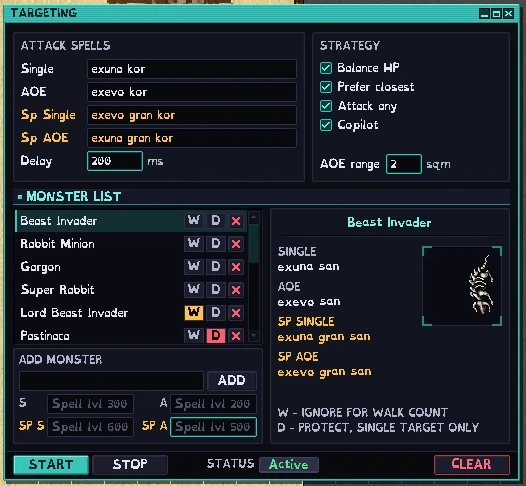
Attack spells
Four spells and a delay
Type the exact words of each spell. These are your defaults for every monster; you can override them per monster later.
Single
Your single-target spell. Used on the current target when nothing better is ready.
AOE
Your area spell. Cast only when it would hit at least two enemies.
Sp Single
A stronger single-target spell. It goes before the normal Single whenever you have the mana and it is off cooldown.
Sp AOE
A stronger area spell. It goes before the normal AOE whenever it is ready.
How the bot chooses
On every turn it tries the area spells first, and casts one only when it hits two or more enemies. If no area spell fits, it uses Sp Single when ready, and Single otherwise. Spells on cooldown or without enough mana are skipped.
Set the delay
Delay is the pause in milliseconds between casts. The default
200 works for most players; raise it if your ping is high.
Strategy
Who gets attacked
AOE range is how many squares
around you count for an area spell when the bot does not know its
exact shape. 2 is a good start.
Monster list
Who to attack and how
Add a monster
In Add monster, type the monster's name exactly as it appears in game and press ADD. With Attack any off, only monsters in this list are attacked.
Give it its own spells (optional)
The four small boxes under the name (S, A,
SP S, SP A) replace your default spells for
this monster only. Leave them empty to use the defaults. Click a monster
in the list to see which spells it will get.
Use the W and D buttons
Each row has two toggles:
W · Ignore for walk count
The monster is still attacked, but it does not count toward the Walking Lure limit. Use it for fast or weak monsters that should not stop your route.
D · Protect
The monster is never attacked, and no area spell is cast while it is inside the area. Only single-target spells hit the others.
Remove what you do not need
The red × removes one monster.
CLEAR at the bottom
empties the whole list at once.
Quick add
Straight from the game
The fastest way to fill the list is from the monster itself, without typing a name.
Open the monster's menu
Right-click the monster in the Battle List, or
Ctrl + click it on the map. Without classic controls, a
plain right-click on the map works too.
Add to Targeting
Click Add to Targeting and choose Attack, Protect or Ignore for walk count. The monster appears at the end of your list.
Edit it the same way
On a monster already in the list, the option reads Edit Targeting: switch Protect and Ignore for walk count on or off, or remove it.
Run it
Start, watch, stop
Press START
The status changes from Off to Active. The
bot picks a target and casts on its own, turn after turn.
Stop whenever
STOP turns it off. Closing the window does not stop it.
FAQ
When it does not attack
It does not attack a monster.
It never casts my area spell.
It keeps switching from the target I clicked.
Does it attack in protection zones?
I pressed CLEAR by mistake.
Still stuck? Active subscribers can DM the
SarahBOT Discord bot directly,
or ask in #support.