Watch it first
The whole module in a minute and a half
This short video walks through every section of the window with a real hunt in the background. The video only loads when you press play.
Before you start
Three quick checks
- Healing is included in every plan, Free included.
-
You are logged into the game
and the bot is logged in with Discord (the button at the top of the SarahBOT panel shows
LOGGED IN). - Your potions and food are in an open backpack, because you will drag them from there.
Press Ctrl + I to show the SarahBOT panel and click
HEALING. You will find it in
the Frequent and
Combat groups. Everything you
change is saved automatically.
Placing items
Drag and drop is the only way
Every square slot in this window (potions, items, timers, rings, amulets, XP boost and stamina) is filled the same way. There is no list to pick from and no ID to type.
Open your backpack
Open the backpack that holds the potion or item you want.
Drag it onto the empty slot
Hold the left mouse button on the item, move it over the empty square in the Healing window and release. The item icon appears in the slot and, for potions, the Charges bar fills in.
Right-click to clear
Right-click a slot to empty it. To swap an item, clear the slot and drag the new one in.
Potions
Two automatic potions
Drop the potion and pick HP or MP
Drag your health potion into the first slot and leave it on
HP. Use the second row for a mana potion on
MP.
Set the percent
The potion is used when your HP or mana is at that percent or lower.
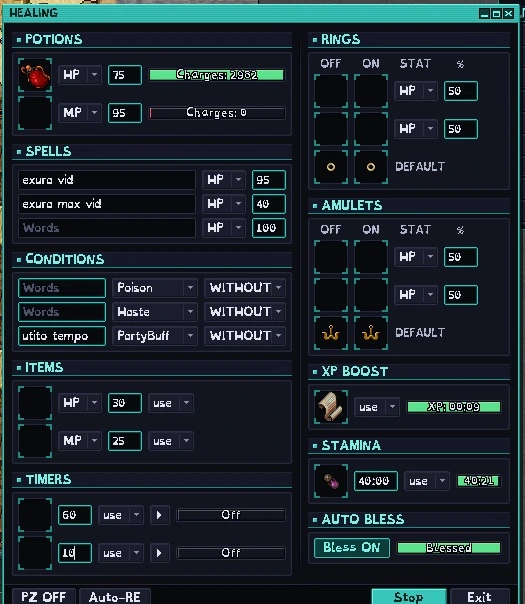
In the screenshot the health potion fires at 75 and the
mana one at 95.
Watch the charges
The bar next to each row shows how many charges you have left. To refill them automatically, open Auto-RE at the bottom of the window.
Spells
Up to three healing spells
Type the spell words, choose HP or MP and the percent. A common setup is a small heal kept on all the time and a big one for emergencies:
exura vid · HP · 95 Tops you up after every hit.
exura max vid · HP · 40 Takes over when a big hit drops you below 40%.
When several rules match, the one with the lowest percent goes first, so the emergency heal always wins. The bot also skips spells that are on cooldown or that you do not have the mana for.
Conditions
Spells based on your state
Each row casts a spell depending on a status of your character, like Poison, Haste, ManaShield, Paralyze or PartyBuff.
Pick the state
Type the spell, then choose the state in the middle box.
WITHOUT or WITH
WITHOUT casts the spell while you do
not have the state, which is perfect for buffs: with
utito tempo + PartyBuff +
WITHOUT, the buff is recast every time it runs out.
WITH casts while you do have it, for example a
cure spell while you are poisoned.
Items & Timers
Emergency food and long buffs
Items: emergency food
On Necroxia, food heals a huge amount of HP but has a long cooldown.
That makes it your emergency button: put the food in an
Items slot with a low percent, such as HP 30, and it saves you from the hits that
almost kill you.
Items run on their own, separate from potions, so the food still
goes in while you are drinking potions. The use /
with box picks how the item is used: directly, or on
yourself.
Timers: Pollo & Tropical
Special food like the Pollo or the Tropical raises your max HP and mana for some minutes. A timer uses it again and again on a fixed interval.
Drop the item and set the interval
Drag the food into a timer slot and type how many minutes to wait between uses.
Press the play button of that row
Each timer has its own play button. The bar counts down and the item is used every time it reaches zero. Press it again to turn that timer off.
Right column
Equipment, boosts and blessings
Rings & Amulets
Two rules each. Put the item as it looks in your backpack in OFF and, only if it changes ID when worn, as it looks equipped in ON. Pick HP or MP and a percent: below it, the item is equipped. The DEFAULT slot is what goes back on once you recover.
XP Boost
Drop your XP boost item here. It is used only when the XP Boost Time from the Skills window reaches zero. The bar shows the time left.
Stamina
Drop the stamina item and set a minimum such as 40:00. When your stamina falls to that value or lower, the item is used.
Auto Bless
Turn it on and the bot buys your blessings with !bless whenever the golden border of your inventory is missing. It works even with the healing stopped. No gold means you cannot afford it yet; it retries every 30 seconds.
Run it
The bottom bar
Press Play
Press Play. The button turns into Stop, and the bot starts watching your HP and mana at once. Potions, spells, conditions, items, rings, amulets, XP boost and stamina only work while it is running. Timers and Auto Bless have their own buttons.
Choose PZ ON or PZ OFF
PZ ON keeps healing inside protection zones.
PZ OFF pauses it there and resumes as soon as you leave.
Close the window, keep the healing
Exit only closes the window. Your rules keep working in the background until you press Stop.
FAQ
When something does not heal
The potion never gets used.
I cannot type an item into a slot.
Two spells match. Which one is cast?
Nothing heals while I stand in temple.
PZ OFF, so the healing pauses inside
protection zones. Switch to PZ ON if you want it there
too.
Does it keep running if I close the window?
Still stuck? Active subscribers can DM the
SarahBOT Discord bot directly,
or ask in #support.